When a computer malfunctions, the easiest step is often a quick reboot. For many tech hiccups, that’s all it takes to get back on track — problem solved. If only a company rebrand were that simple.
A comprehensive rebrand is more intentional and nuanced than hitting “reset” or initiating superficial changes. After purchasing Whole Foods, Amazon had to shed the grocery chain’s “Whole Paycheck” image. Customers had come to find the store overpriced when compared to competitors, so Amazon cut prices significantly and set up Amazon Prime customers to save even more. The best way to deal with an image problem, according to Amazon? Face it head-on.
This brand realignment didn’t happen for Whole Foods overnight. It took a willingness to dig below the surface to spot signs of consumer disengagement.
Monitoring the Migration of Consumer Wants
Successful rebrands hook people. When Phillips 66 found itself lumped together with a litany of other gas providers, for example, the company launched theLive to the Fullcampaign, which connected the idea of full gas tanks with emotional journeys. The spots garnered attention for their uniqueness and vibrancy, but more importantly, appealing to human emotion — and not being afraid to do so — differentiated Phillips 66 from its competitors.
In addition to connecting with customers psychologically, modern brands must provide perceived value in terms of time. For instance, people pay to join Amazon Prime for its rapid delivery options. Amazon is handing those consumers precious minutes of their lives back.
However, consumers will willingly give up time for brands that have the “cool factor.” This is why people will gladly wait in line for the latest iPhone or drive a few extra miles to Target, even if a Walmart is within walking distance. Consumer decisions willalwaysbe personal. But as the majority swells in one direction, brands would be wise to mark the change. Sometimes, that necessitates an inside-out overhaul.
Know the Signs: Getting Ahead of Rebranding
You might be unsure of whether it’s time for your business to rebrand, so if you spot any of the following flags, take note.
Positive consumer sentiment is waning:Do consumers feel connected to your brand? Are they out there spreading the word? Do you have die-hard fans? If your company doesn’t have a groundswell of support, it may be time to generate some.
Your customer base has declined or flattened:Are consumers aging out of your offering? Are you struggling to connect with the emerging demographic? Unless you’re replacing lost buyers with younger or different-minded customers, you’re headed toward problems.
Influencers aren’t interested in promoting your brand:If you can’t find brand advocates to endorse your offerings, this could be a red flag that consumer sentiment truly isn’t in your company’s favor. Influencers earn a living through paid sponsorships, and many are selective about the brands they work with. When they pass on being associated with your organization, it’s not a good sign.
Change Course: The Steps to a Rewarding Rebrand
Rebrands that are done well are achieved by pairing a healthy dose of reality with a clear sense of where the company needs to go next. To get from the status quo to new frontier, brands can combine a variety of tried-and-true tactics.
Come to terms with the current state of your brand and business.While it can be tempting to put a positive spin on negative numbers, now is the time to take stock and surface your company’s problem areas. You can’t fix what you can’t see.
To help with your stock-taking,seek out an objective external partner, such as a global research firm, to get a true sense of how consumers view your company. You can explore the data the firm gathers to see where you stand, allowing you to make necessary changes to your brand’s image to ensure its survival (and revival). Many organizations conduct internal research, but the results are usually biased when compared to the results from an outside agency.
Think ahead.As you decide on a direction for your rebrand, ensure you have a long-term plan. Flash-in-the-pan rebrands tend to fail pretty quickly. On their own, new logos and websites are not rebrands. Storefront changes spark chatter, but they don’t provide a sustainable shift in business practices. Atruerebrand upends the actual brand experience.
J.C. Penney is a good example of short-term thinking. It launched its “Fair and Square” repositioning — which eschewed high-low pricing practices — without long-term board member backing. Shoppers were confused at best and unimpressed at worst. According to aconsumer survey, shoppers had trouble understanding and comparing the new pricing model and deals. In fact, they said the new scheme actually provided “low value” for their money. The rebrand became a cautionary tale instead of a success story.
Put in the creative work.Make sure your organization is structured in such a way that the rebrand is real from top to bottom. Can this brand image sustain your company for the next several years? Does this shift affect everything from your advertising to your sales associate uniforms? You have to check all the boxes, or there’s going to be a disconnect for consumers. Any change in your company image needs to be holistic.
A rebrand is about changing the identity of your company to communicate your DNA in a new, exciting way. While a good rebrand can be complex, it should also point out the possibilities that lie ahead if you plan, invest, and trust in the process.
This is one of those blogging lessons that seems so hard to learn. You want to enjoy blogging but you also want to know you will actually make money through this medium. I know. I have been there. Making money and driving traffic are two common goals of all professional bloggers but the money and […]
Elon Musk wants you to know that he is going offline. Again.
The Tesla and SpaceX CEO shared his parting thoughts on Friday morning, letting the world know that, well, he has some doubts about Twitter and is saying goodbye for the time being.
"Not sure about good of Twitter," wrote the CEO on Twitter. "Going offline," he added.
Notably, this is not the first time Musk has decided he'd had enough with his so-online-it-lands-him-in-court lifestyle. He has, on numerous previous occasions, declared his intent to just get away from it all — even if only for a few days. Read more...
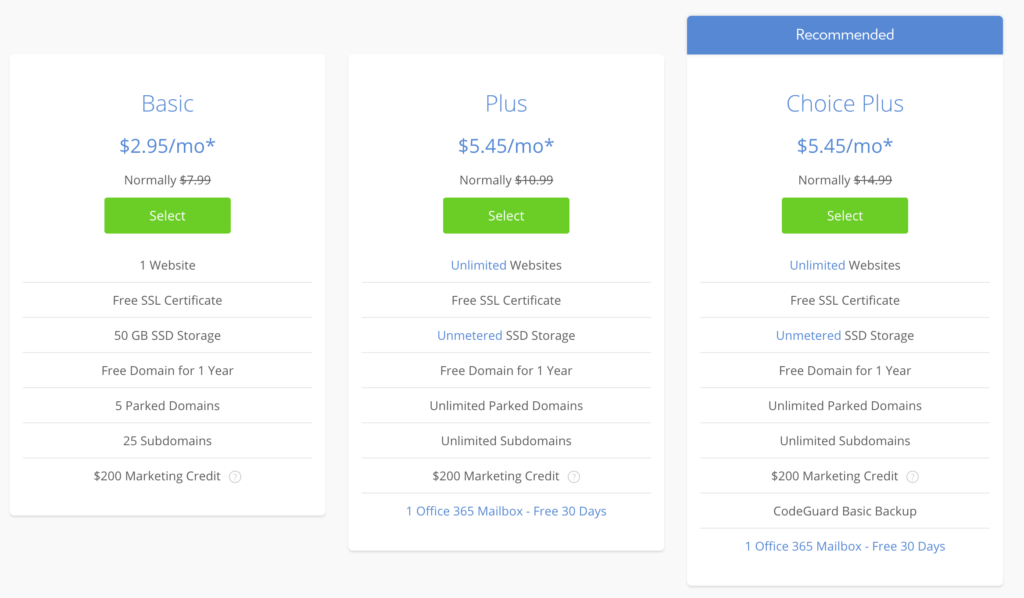
Price starts at $2.95/mo
Great uptime
24/7 phone and chat support
WordPress recommended host
Bluehost is one of the most popular and trusted web hosts. They’re also one of the three hosts that WordPress officially recommends.
They’re a perfect choice for WordPress sites. Once you sign up, you’ll be able to install WordPress super easily. You’ll have your site live within 15 minutes from now.
Bluehost also has some of the lowest pricing around, plans can get as a low as $2.95/month. That’s crazy low.
Yes, you will be on shared hosting. So if you or someone else on your server gets a huge spike of traffic, your site could go down. But honestly, this almost never happens. I’ve had websites on shared hosting for over a decade and never had a site go down.
The value per dollar that you get from Bluehost on a WordPress site can’t be beat. And it’s more than powerful enough for the vast majority of websites. They’re also widely recommended throughout the industry and have the official recommendation from WordPress. For the vast majority of folks, Bluehost is the best option.
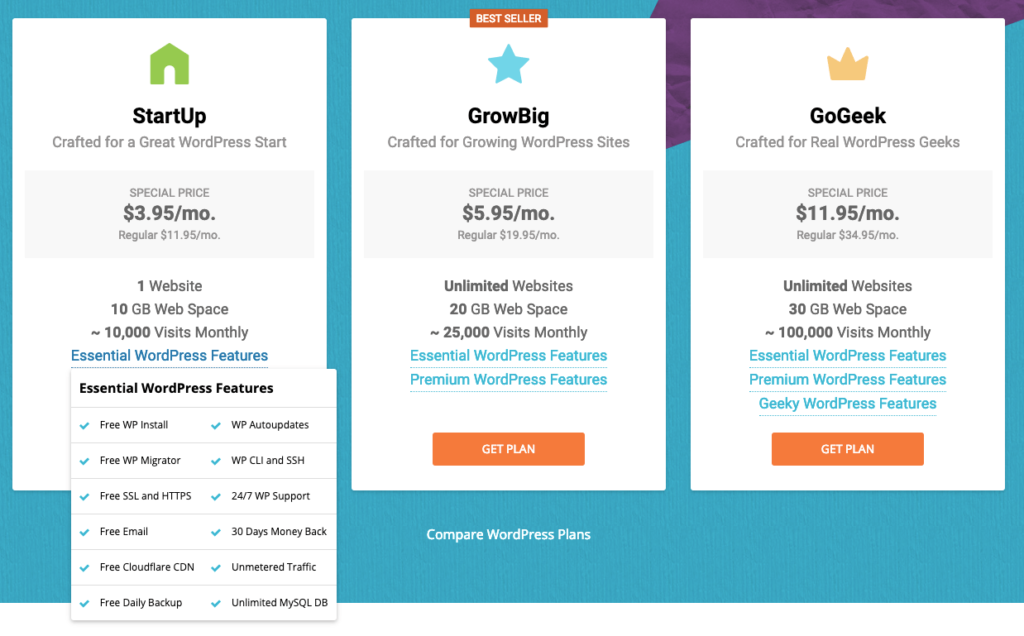
Price starts at $3.95/mo
Autoupdate and daily backups
24/7 support
A WordPress recommended host
SiteGround is one of the other WordPress recommended web hosts. You also get some advanced features for WordPress like automatic updates and enhanced security on all the Siteground plans.
Just remember, the quality of these features won’t be as good as a full managed WordPress host like WordPress. There’s only so much customization that can be done on normal hosting. It’s still a great option for most folks though.
I recommend the “StartUp” plan, you’ll get up to 10GB of space and up to 10,000 visitors for 1 site. The intro plan is $4/mo. for the length of your first contract, then will bump up to $12/mo.
The three features I love best are the WordPress autoupdates, 24/7 WordPress-knowledgeable support, and free daily backups. This covers most of the problems you could run into, freeing up more of your time to focus on your business or project. Read more about their services in my complete SiteGround hosting review.
Starts at $35/month
Biggest name in WP hosting
A premium product with a premium price
Easily the all-around best
For pros, I recommend WP Engine. It’s definitely the best option for managed WordPress hosting. If you’re trying to get serious and build a high-traffic blog or business, use WP Engine. It’s, by far, the most widely known and respected company for managed WordPress hosting.
Full disclosure: We use WP Engine at Quick Sprout.
I don’t recommend it for anyone who’s just starting out since it’s much more expensive. We’re talking $35–100/month versus $4–15. Most WordPress sites would do much better with Bluehost or Siteground. Not only will you save a bunch of money, you won’t need the serious features that come with WP Engine.
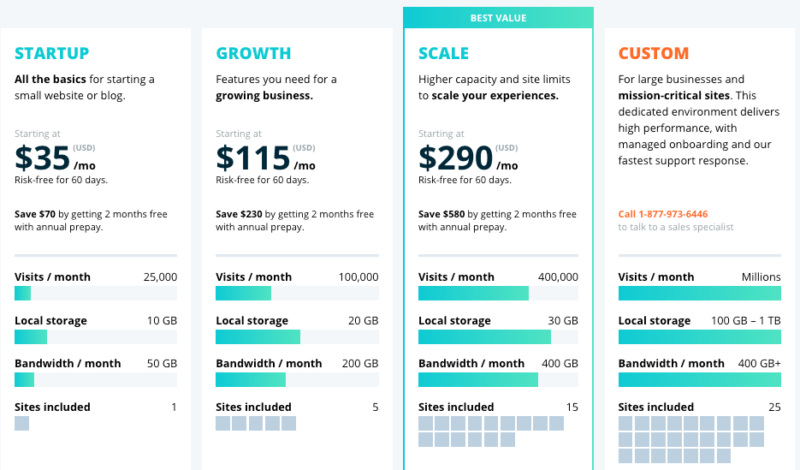
For $35/month, you can host one 10GB site with a limit of 25,000 monthly visitors. The next tier of service is a hefty $115/month for five sites and 100,000 monthly visitors. If you get a spike in traffic and go over these traffic limits, you’ll get hit with overage fees.
WP Engine’s plans are more expensive than a shared hosting provider — but the quality of service is worth it.
Service is where WP Engine shines. As a managed host, it maintains speed and security at the server level — meaning you don’t have to do anything at the site level. You don’t have to research and rely on plug-ins to shave seconds off your load time, or become an expert on the best practices for building a lean site. You don’t have to carve out time to update your install and plugins, or run backups, or implement security features to ward off brute force attacks. WP Engine takes care of it all behind the scenes.
Customer service is also excellent, with 24/7 chat support for all tiers of service, and 24/7 phone support starting at the second tier. Its ticketing system is trackable, and its knowledge base is one of the best. And because support is an expert at one thing only — WordPress — the answers you get from human interactions tend to be nuanced and comprehensive.
Every time I’ve had to reach out to their customer support, I’ve always been impressed. The speed, thoroughness, and expertise is world-class.
Price starts at $14/month
Geared toward freelancers and agencies
Easily build and transfer sites to clients
User-friendly interface
Flywheel is a managed WordPress host for freelancers and agencies. If you build sites for clients, you should seriously consider Flywheel.
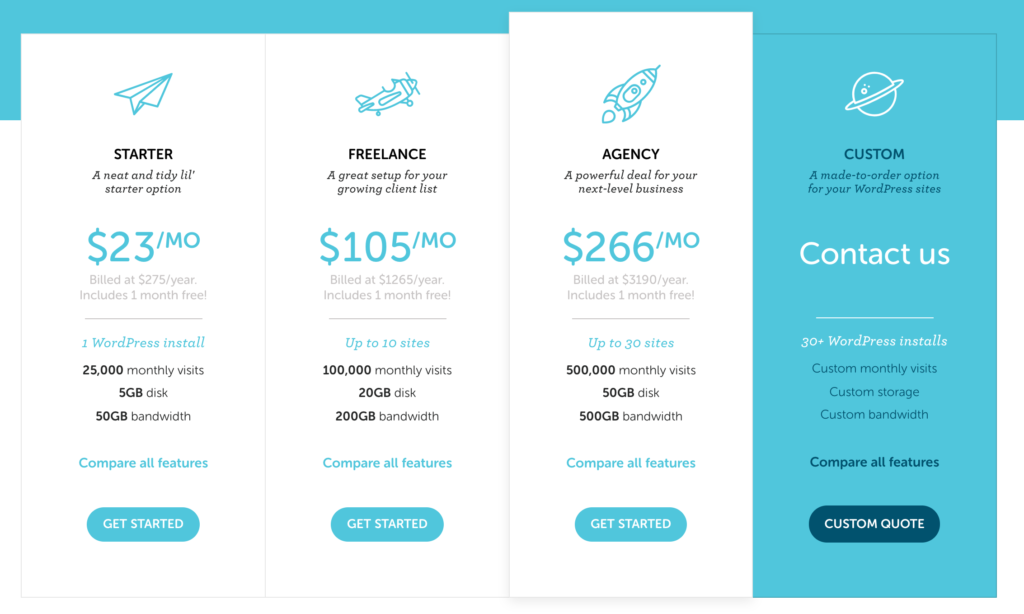
Compared to WP Engine, Flywheel has a significantly lower price for entry. Flywheel’s plans are divvied up by number of sites — three plans for a single sites, and another three plans for multiple sites (with a customizable enterprise option thrown in) — which gives even little starter sites a chance to get in on the fully managed WordPress game without having to pay for more than they need. Flywheel offers a single site plan with 5,000 monthly visitors and 5GB of disk space for $14/month. That’s half of WP Engine’s lowest tier.
As a freelancer or agency, you’ll get great features like like “blueprints” for the themes and plugins you use over and over again. And 14 days on a free, password-protected demo site to show your work before having to pay. You can also easily transfer billing on any of your sites to a client.
Most businesses won’t need features like these. I don’t for example. But I really wish Flywheel was around when I was building websites for clients back in the day. It would of saved me a ton of time and made me look like a true pro with how seamless everything is.
If you build sites for clients, start using Flywheel.
#5 – Kinsta — Alternative managed WordPress hosting
Price starts at $30/month
Premium managed WordPress hosting
All features included across all plans
Built for scalability
If, for some reason, you don’t want to use WP Engine as a premium WordPress host, go with Kinsta.
Kinsta is also a full managed WordPress host with similar prices. So it makes a great alternative if WP Engine isn’t an option for you.
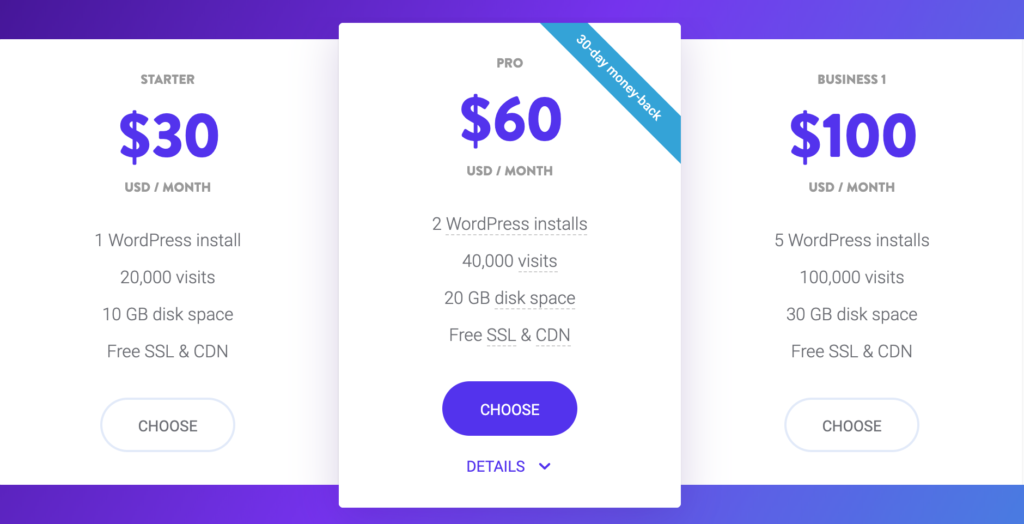
A popular, robust managed WordPress host that emphasizes scalability. Pricing starts at $30/month for 20,000 monthly visitors and scales up from there:
The plans keep going too, Kinsta can handle any volume of traffic that you need. You won’t have to worry about switching from outgrowing them.
One especially nice thing about Kinsta is that you get access to the same features across every plan, as opposed to upgrading to a higher-priced plan to unlock something. It also makes Kinsta’s pricing super simple. Pick the plan based on your traffic and you’re good to go.
Price starts at $29/month
Designed for advanced users
Extreme customization available
Server-level access
Liquid Web is the most expensive host on our list. It’s a powerhouse designed to service other powerhouses — its cheapest plan is $99/month for 10 sites. But if you’re an enterprise customer, or are charged with manning multiple WordPress sites, little will go wrong when you use Liquid Web. It automatically updates WordPress and your plugins.
Let’s say that you need more control than any of the other hosts on this list. But doing everything yourself through AWS isn’t appealing. Then Liquid Web is for you. You won’t have to do nearly as much setup and upkeep as AWS while still having a lot more control than other hosts give you.
You’ll get all-level access to MySQL, SFTP, and SSH. You also get Git version control. Security, speed, and customer support are virtually unparalleled. Liquid Web is obviously not right for everyone. Small businesses should choose one of the other options, Liquid Web would be way too much. For power users, Liquid Web could is the WordPress hosting that you’ve been looking for.
What is managed WordPress web hosting?
First, let’s go through normal WordPress hosting. You’ll get a regular web host and that host usually gives you an easy way to install WordPress. You have a host, WordPress is installed, and that’s it.
Most “WordPress hosting” works like this. The installation can be a “1-click” install but nothing special happens after that. You get the basic version of WordPress, the same version that you’d get if you installed WordPress on a server that you owned.
Managed WordPress hosting steps things up a notch, you get a bunch of extra stuff.
Instead of a basic host with WordPress installed, everything is built from the ground up with WordPress in mind. The hosting infrastructure is tailored to WordPress and the hosting company usually customizes WordPress itself to make it better. Your site will be a lot faster, will be more secure, and you’ll have much better support since the hosting team specializes in WordPress.
The downside is that managed WordPress hosting is more expensive. This makes sense, you’re getting more value so the price is higher.
Here’s what to expect with managed WordPress hosting:
Managed WordPress web hosting is faster. More server- and application-level optimization provided by the host = better speeds. Caching is done at the server level, versus with front-end plugins. MySQL and PHP is configured to the best version for WordPress.
It’s more secure — and therefore more stable. The behind-the-scenes teams are only looking to stop WordPress-focused attacks and can enforce WordPress-specific policies on its users (e.g. banned plugins). This automatically correlates to more uptime.
Customer support is better. The help desk and support staff of a managed WordPress site are WordPress experts. They understand your site and the plugins you’re using. They are essentially optimized to help you — not a normal host with customers running all sorts of applications. On top of that, managed hosts have built their business model on providing service, unlike cheaper hosts that may have not invested in customer support or who may even purposely provide “unbearable tech support.”
More maintenance is done for you. Automatic WordPress updates aren’t hard to come by, managed WordPress hosts all automatically install security updates. The backup process is faster and more reliable, and daily and restores are typically free. WordPress is automatically (and correctly) installed. You also usually get a staging environment to try new things with no risk to your current site.
These types of services alone can justify the increased price tag of managed WordPress hosting. As one WP Engine user explained, simply running WordPress updates and doing QA can take about 30 minutes a month. If you or your dev’s time is worth $50/hour or more, you’ve essentially paid off an entry level WP Engine plan right there.
Recap: The best WordPress web host
Most folks should go with Bluehost or Siteground for their WordPress hosting. Once you set up your account, you can easily install WordPress with just a few clicks. From there, you have a fully functioning WordPress site at a low hosting cost.
You do have the option to go with managed WordPress hosting which gives you premium features, speed, and security. It’s worth considering for folks building high-traffic websites. We use managed WordPress hosting for Quick Sprout. WP Engine is the best option here.
from Quick Sprout https://ift.tt/2r4hAKy
via IFTTT
No two college students' experiences are totally identical: Some people retain very little information and others retain zero information, for example. But the college major you choose — whether it's physics, art, or (help) creative writing — still comes with a set of sometimes-true stereotypes.
That's what the "majors be like" meme, which made the rounds on Twitter this week, is all about. It roasts pretty much every major you can think of, sometimes lightly and sometimes mercilessly: English majors put their papers off, philosophy majors deal only in theory, communications majors are majoring in something literally everyone does anyway, business majors party in lieu of studying. Read more...