Showing posts with label Internet Marketing Ninjas Blog. Show all posts

Tuesday, June 30, 2020

Find and Fix Mix Content Issues with This Free Tool

Mixed content SEO tool

Among newer SEO issues that have become a widespread problem is so-called “Mixed Content” issue.

Let’s find out:


What Is Mixed Content?


Mixed Content issue occurs when a secure page serves non-secure content (images, videos, but also scripts, styles, etc.)

Mixed content occurs when initial HTML is loaded over a secure HTTPS connection, but other resources (such as images, videos, stylesheets, scripts) are loaded over an insecure HTTP connection. This is called mixed content because both HTTP and HTTPS content are being loaded to display the same page, and the initial request was secure over HTTPS.

Source: Jo-el van Bergen (Google)

There are two types of mixed content:

  • Passive mixed content: insecure videos, images,and audio files, and other resources that cannot interact with the rest of the page.
  • Active mixed content: non-secure iframes, scripts, stylesheets, flash resources, and other code that a browser can download and execute.

The issue has become a widespread problem after lots of sites switched to HTTPS protocols, following Google’s persistent recommendation (when it was confirmed as a ranking factor).

Mixed content hurts the website’s security and speed, but most important, it causes Google Chrome (and probably other browsers) to block your non-secure content.

Put simply, previously Google Chrome would show an error when a secure page loads non-secure content, but now the browser would quietly refuse to load it

Mixed content is blocked in Google Chrome

While this may be better for the user (they will not rush to leave your site when being alerted of some weird security errors), this also makes identifying mixed content harder for the website owners.

Does Mixed Content Impact Your SEO?

Google doesn’t say that there’s any direct impact on organic rankings for pages that serve non-secure content. We do know that Google is over-protective of security and usability of pages that show up in Google’s SERPs.

Since Google defines mixed content as

degrading the security and user experience of your HTTPS site.

Source: Google

On top of that, as mentioned above, HTTPS encryption is an official Google’s ranking factor, so a partial absence of it must one too.

So it is safe to assume that Google may be flagging mixed content as something they may not want to on the very top of Google

How to Spot and Fix the Mixed Content Issue


Now that identifying mixed content by using a browser has become harder, how to go about finding and consequently fixing it?

Secure Checker is the free SEO tool that will alert you of any mixed content issues.

The free Secure Checker uses a headless Chrome browser to load each URL which is entered.

What this means is that the mixed content errors displayed by the tool are directly pulled from the browser console, hence these are the same errors that a live Google Chrome browser would identify:

Mixed content tool

This is exactly the content that will be blocked by Google Chrome.

Conclusion

Mixed content should be part of any SEO audit or usability audit from now, so this free tool will hopefully turn helpful. Please do let us know if you have any feedback or feature requests in the comments below!

The post Find and Fix Mix Content Issues with This Free Tool appeared first on Internet Marketing Ninjas Blog.


from Internet Marketing Ninjas Blog https://ift.tt/2NFjNEj
via IFTTT

Friday, May 1, 2020

The SEO Plugin You Have Been Waiting For

Google search results are getting richer and harder to deal with. You cannot copy URLs of search results until you click them. It is impossible to copy the list of URLs ranking on page 1. You cannot do much when trying to analyze search result pages.

To make SERP analysis doable, we have come with a new Greasemonkey plugin helping you make sense of Google search engine result pages and easily copy anything you need: Get URLs from Search Results Plugin

To Install the SEO Plugin:

Keep these options unchecked for the best results:

Keep these options unchecked

The SEO Plugin for Google SERPs

As soon as you install the plugin, make sure Greasemonkey is active in your browser and head to Google’s search. There you will immediately notice several improvements:

Numbered Search Results

The SEO plugin will display all organic search results at the bottom, numbered and easy to copy-paste anywhere you need:

The plugin makes it easy to figure out the actual organic position of any page ranking for your target search query. You can also easily obtain the full list of your organic competitors

There will be as many links as you have your search results to show within one page. If you have 50 (like me), the plugin will list all 50, conveniently numbered.

All links in the list are direct, so you can copy any without having to open the link.

People Also Ask Results

If you have this plugin running you’ll be able to easily copy-paste “People Also Ask” results that appear for your target query, as well as see the featured URL:

An easy way to copy questions from Google’s “People Also Ask” search element

Related Searches and Brands

Google shows a lot of types of search suggestions these days prompting its users to dig deeper into the topic. These educational search elements driving users deeper into all kinds of search results include:

  • Searches Related To
  • Related topics
  • Related entities (similar brands or places), etc.

This SEO plugin will give you a good overview of all of those:

These are great for content development and SEO research purposes: Find which entities, categories and keywords Google deems your target query relates to

Video Carousel Results

You can also access links to top video results which made to Google’s carousels:

Direct links to video results from inside the Google’s video carousel

Knowledge Graph Links

The plugin will also extract links from Google’s Knowledge Graph and list them below the search results. For example, for a navigational queries, it will look something like this:

Google’s Knowledge Graph links for the search query [amazon]

And for an informational queries, it will display all data sources Google is using to create an info box:

Google’s Knowledge Graph data sources for the search query [pizza]

Finally, while you can easily copy-paste any block, there’s also an Excel expert for you to play with.

The implications of this plugin are truly limitless as it makes any SEO task much easier and faster. Use it for competitive research, reputation management, SERP analysis and more.

The post The SEO Plugin You Have Been Waiting For appeared first on Internet Marketing Ninjas Blog.


from Internet Marketing Ninjas Blog https://ift.tt/2xtBC4K
via IFTTT

Wednesday, December 18, 2019

How to Grow Your Email List

Never underestimate the value of an email. Email marketing has proven itself again and again to be the one marketing avenue that consistently brings in the highest conversions for companies all over the world.

There is a reason they are always pushing to get customer email addresses.

No matter the size of your enterprise, you can benefit from building an email marketing list. The faster you do it, the sooner you will start seeing the results.

Marketing emails mean click-through traffic, greater sales, brand visibility, and direct customer engagement. Even social media doesn’t manage to bring in the ROI of emails.

Some email marketing stats:

  • According to Radicati’s 2016 Email Statistics report, email will be used by 3 billion people by 2020.
  • 80% of retail professionals in the US said email marketing drives customer acquisition and retention
  • On average, companies are attributing 23% of their total sales to the email marketing channel, compared to 18% in 2013. This equates to a proportionate rise of 28% in just one year.
Did you know? Companies are attributing 23% of their total sales to the email marketing channelClick To Tweet

Not only is that a significant increase for such a short period of time, but it proves that those who claim email is dead are dead wrong. It is a more powerful tool than ever.

There are many different ways that will help you rapidly build up an email list. These are some of the most effective.

1. Build A Landing Page With A Sign Up Sheet


If you have a website or product launching, you can create a simple landing page to begin building hype. Get customers early by putting up an email form for people to be alerted the moment you launch, and so be the first to know.

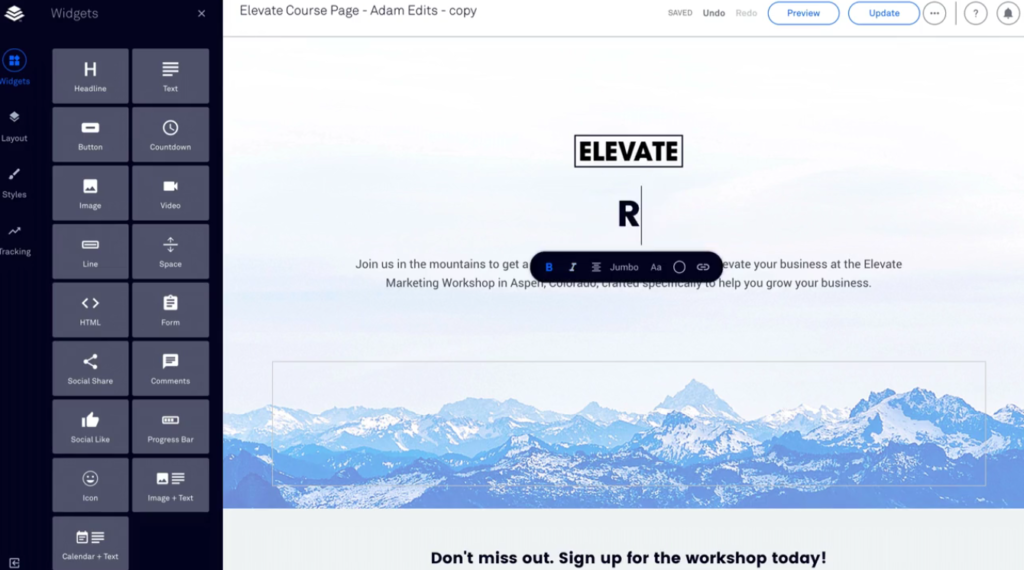
Services like LeadPages exist to help you do this more quickly. You could have a page up in minutes, and begin gathering those sign ups as soon as it is live.

The most important thing about a landing page many businesses miss: It should be fast! I can’t believe how many leads are lost just because the page doesn’t load. Use this free tool to diagnose your page speed and also check out this guide on how to properly host your website to avoid downtime issues.

2. Host A Webinar


Webinars are becoming more popular by the day, and it is no wonder. They give people all the benefits of going to a conference lecture without ever having to leave their home. It is convenient and a lot cheaper without the hotel and airfare.

Host a live webinar, and then put the recording on your website for people to see in their own time. Not only is this a great content strategy, but it gives you an opportunity to create a sign up form that includes both email addresses and other important data.

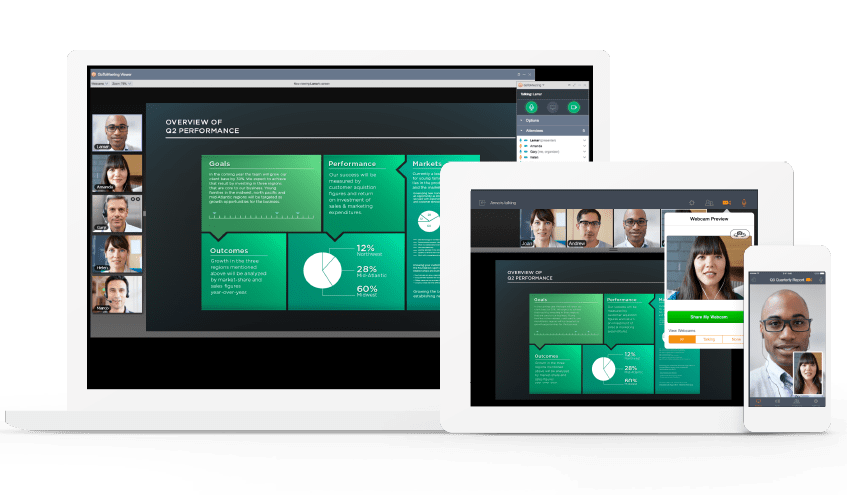
Tools like GoToMeeting and ClickMeeting makes it very easy to host, customize, record and invite people to webinars:

A single webinar can bring in thousands of emails.

3. Offer Premium Content


Let’s say you are reading this post, and you want more information. You get to the end and you find out there is a much more thorough, instructive version available. All you have to do is provide your email, then follow the confirmation link to this premium content.

This is another great strategy for both content marketing and email acquisition. Usually referred to as content upgrading, it is guaranteed to get your reader’s attention, and their info.

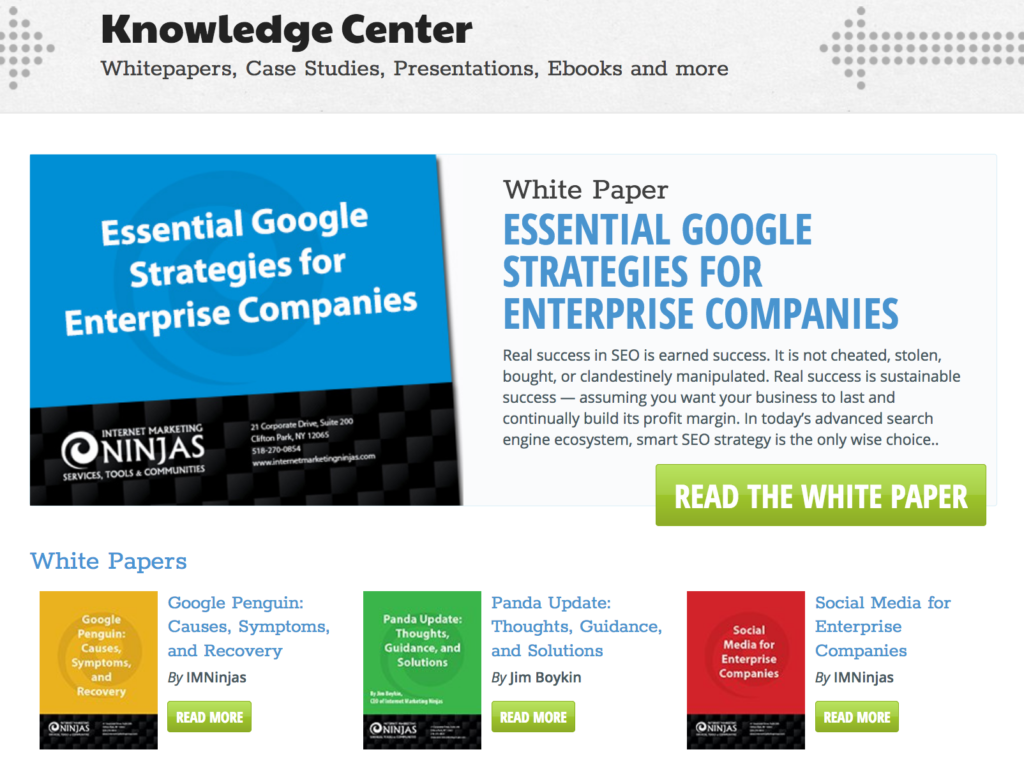
Check out IMN Marketing Resources page for a solid example of premium content we are offering:

Marketing Resources

4. Offer Emailed Incentives


When Google first released Google Plus, they took a handful of invites and gave them to early adopters as they anticipated the launch. Then those users gave out invites to their friends that wanted to try it.

The sheer number of invites that were sent out this way was incredible, and all done through email. It created a powerful force that made the G+ launch a busy and highly anticipated one. While they were not able to engage those users well enough to sustain the growth, it has worked very well for creating the initial buzz.

Offer users the ability to send special offers to their friends if they provide their email. The friend gets the offer, then provides their own email address, and passes it on.

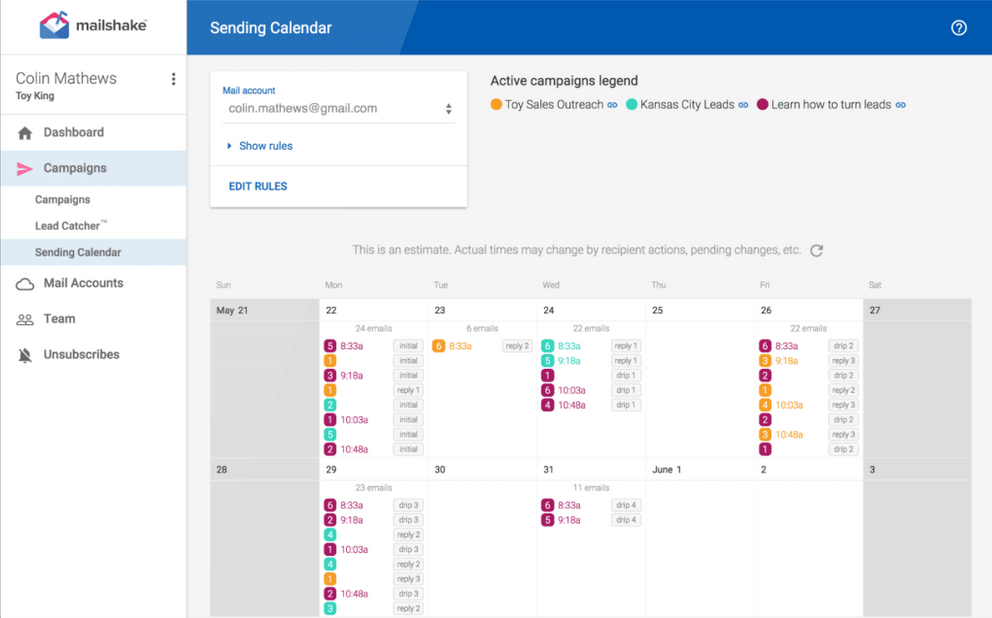
Mailshake is a great tool to help creating that initial buzz. You can use it to reach out to niche influencers and invite them to your platform. Mailshake handles emailing and following-up and gives you a nice dashboard to monitor your progress:

mailshake

5. Publish eBooks

Publish eBooks

eBooks are a great way to spread your content, increase authority, and gain traction in your marketing campaign. Offer your ebooks free for an email signup, and you will see your email marketing list grow very quickly.

Just make sure you are creating valuable and well written ebooks. Don’t sacrifice quality for a quick product that only exist to build your marketing list. That should be a plus, not the singular goal.

Conclusion

Building an email list is important, and will lead to greater conversions than any other method available. These are some of the most effective ways of gathering them. The sooner you put them into practice, the sooner you will start reaping the benefits.

The post How to Grow Your Email List appeared first on Internet Marketing Ninjas Blog.


from Internet Marketing Ninjas Blog https://ift.tt/2r5Hzlb
via IFTTT

Tuesday, December 10, 2019

Google’s rel=”sponsored”: Are You Going to Use It?

A few weeks ago Google announced support for a new link attribute rel=”sponsored” (together with its sister attribute rel=”ugc”).

In addition, they also mentioned that rel=”nofollow” attribute will become even fuzzier than it used to be as Google was going to start using it as a “hint”

rel=”sponsored”: Use the sponsored attribute to identify links on your site that were created as part of advertisements, sponsorships or other compensation agreements.

To sum up key points from the announcement:

  • There are now more than one way to inform Google of your linking patterns (i.e. to mark sponsored and user-generated links)
  • All of those link attributes are going to be used as “hints”, meaning that Google will officially use nofollow links to inform its algorithm of this signal
  • There’s no need to do anything with your current nofollow links

The announcement caused a good deal of discussions which I was monitoring for some time to create this summary.

SEO speculate that the new attribute was introduced in response to lots of “core” sites applying site-wide nofollow making it impossible for Google to understand which of those links should actually be taken into account and how to make sense of that.

Rel=”sponsored” Carries No Pagerank

Over at Pubcon, Google’s Gary Illyes shared that the link attribute carries extra information but passes no PageRank:

No PageRank

It is – again – confusing because Google states that all those tags attributes are going to be used as “hints” – so what does that mean if they are not going to flow Pagerank?

This has now changed. All the link attributes — sponsored, UGC and nofollow — are treated as hints about which links to consider or exclude within Search

So far tests show no difference in using rel=”nofollow” or rel=”sponsored”.

It’s Not For You, It’s For Google

Many people were left wondering why would they use the attributes anyway. What is there for website owners?

Well, basically nothing.

Over at SMX advanced Gary Illyes stated that the new link attribute was optional and Google needed it to “to understand linking patterns and how people are linking”.

And SEOs reaction was ranging from favorable to sarcastic, and sometimes it is hard to tell one from another:

The Future of the Attribute Is Likely to Be That of Rel=”Author” & Rel=”Next”

In most cases, SEOs remain skeptical expecting Google giving up on the attribute after failing to see a wide adoption, just like they gave up on rel=”author” and rel=”next”/”prev”

Still, many of us think that helping Google “train” its systems and understand web patterns better by using the attribute may be a noble cause, even though it may have no future.

I am saying “many of us”, not meaning I personally share that sentiment.

Others suggest that introducing rel=”NoOneCares” might be a better idea showing that Google’s algorithm is mature enough for it to handle linking automatically without forcing yet another tag on us.

Waiting for rel=”NoOneCares”, when Google is finally smart enough to decide for itself what is good vs what is popular among the 0.01% of the population who post links on the internet.

Time will show but let’s not forget that Google did manage to force rel=”nofollow” on us, despite all odds, so it will all depend on how aggressive Google is going to be with this one.

nofollow

As Neil Patel points out in his review, a wide adoption of social media giants of the sister attribute rel=”ugc” may help the adoption.

WordPress has already announced their official support of rel=”ugc” attribute making it a default for the comment section starting from WordPress 5.3. The change went into an affect on November 2. So update your WordPress if you want to be in.

With WordPress joining so quickly, there’s hope for the link attributes.

SEO Tools Showing Rel=”Sponsored”

Not many tools have caught up with the announcement yet, but we know at least two that have added support for the new attribute:

Screaming Frog rel=sponsored

There may be more tools supporting rel=”sponsored” attributes, so post in the comments if you are aware of any.

Are you using the new attribute and what are your thoughts? Let’s discuss!

The post Google’s rel=”sponsored”: Are You Going to Use It? appeared first on Internet Marketing Ninjas Blog.


from Internet Marketing Ninjas Blog https://ift.tt/36nzdUZ
via IFTTT

Wednesday, October 30, 2019

Google’s “People Also Ask” (Related Questions): What They Are, and Why You Should Care (Updated)

If you have recently put in a search term in Google, you may have noticed the results containing an expandable grid box. In this box are a series of questions involving the search term you looked for.

Google people also ask

Each of these questions can be expanded using a drop down menu to see the answer. The answers offer a link for continued reading in the page they have been drawn from as well as invite you to search for that specific question:

Google people also ask expand

What’s really interesting about “People Also Ask” boxes is that they give you some insight into Google’s understanding of any topic. For example, if in the above screenshot you clicked a question related to “lab-created diamonds”, the further questions which will immediately show up below will all revolve around “lab-created diamonds”:

Google people also ask follow up

On the other hand, if you were to click a different questions, Google will show a different set of follow-up questions:

Google people also ask

As you can imagine, this offers some great information to users that want additional questions answered without hunting for them.

The boxes never come on the very top of of search results: Instead, they come further down the page inspiring the user to dig deeper.

Finding The Right Queries

The related question boxes don’t show up for every search term.

More often than not, Google only creates question boxes for the most general, often searched terms. The more narrowed the search term or phrase, the less likely it will be to have question boxes.

To generate the list of “People Also Ask” questions, run your domain in our “Featured Snippet+ Tool“:

featured snippet tool people also ask

You can also see related questions on a page-level:

featured snippet tool people also ask

Relying On Authority and Quality

Your authority is important here. Looking at the related questions sources, they tend to be drawn from the most popular results from a search. For example, if you search for [chocolate diamonds], the “related questions” box contains answers from a museum, a recognized diamond expert, and a very old diamond company.

Interestingly, these are not the ordered results of the search, but they are within the first page. So at least some of the priority seems to come from the strength of the content.

Obviously the quality of your content is going to matter a lot here, and probably more than whatever algorithm beyond quality Google uses. The more clear, well-structured and informative your content, the more sense it will make for Google to choose to use the info over other websites.

You also want to be careful of where the content is, and how it is presented. You need to have clear questions and answers in the text itself.

Notably, most pages (but not all) featured in the “related questions” box also rank in quick-answer boxes in the corresponding query.

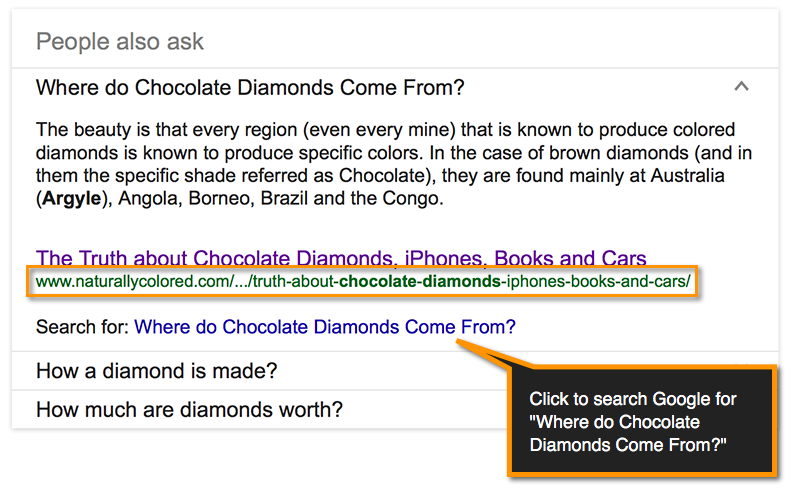
Here is the question – answer in Google’s “People Also Ask” (Related Questions) Box:

Google's "People Also Ask" (Related Questions

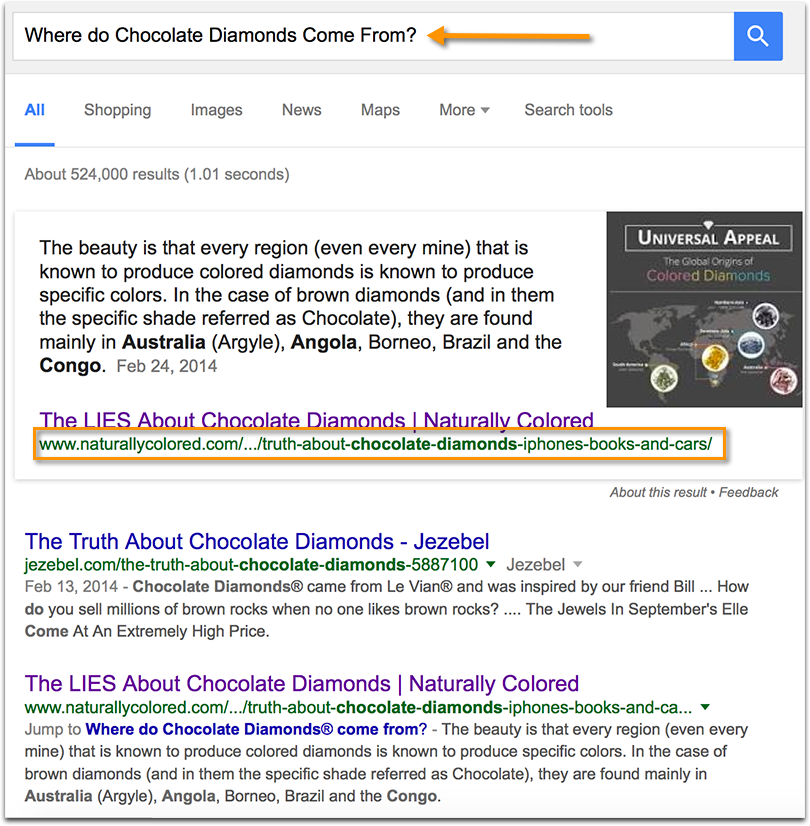
And here’s the same page featured in the quick-answer box for that linked query:

Google's "People Also Ask" (Related Questions

So the two features are somehow connected.

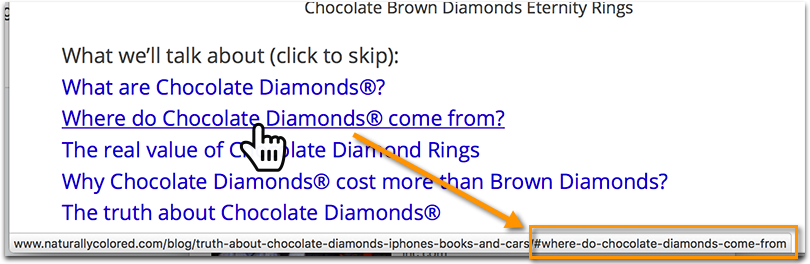
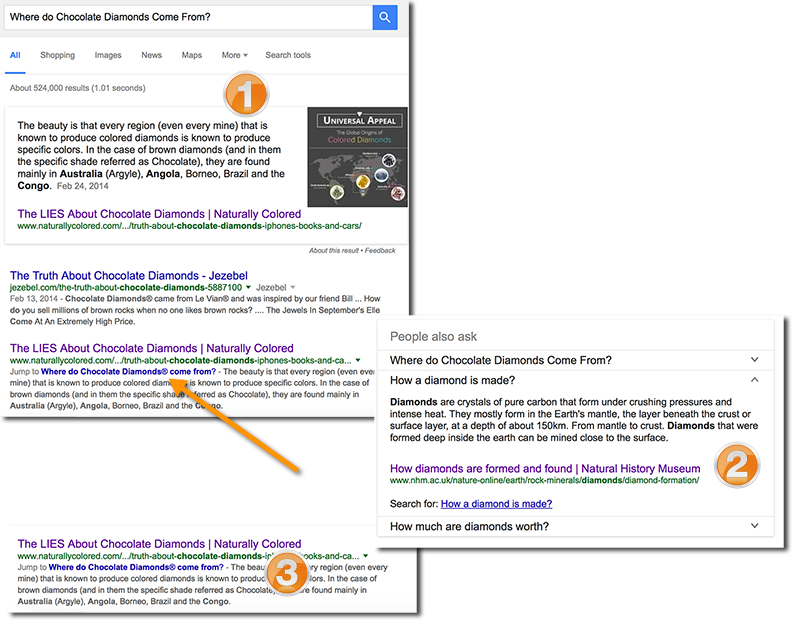
Notice also: In the above example that company has a mini-site jump link within the search snippet taking you to the answer of the question within the page.

This one originates from on-page table of contents that works as an anchor link:

On-page clickable table of contents

So in this case, here’s what the optimization strategy and the results looks like:

  1. Write indepth content covering a number of related questions;
  2. On top of the page, create a table of context, each jump-link taking you to the part of the page answering each question;
  3. Enjoy additional exposure in search results:
    1. Get featured in quick-answer boxes
    2. Get featured in the “People also ask” box
    3. Get an additional mini-site link in the search snippet

Google's "People Also Ask" (Related Questions)

Should Schema Be Included?

Structured markup may or may not be needed here. I was never able find any correlation between having Schema markup and being featured in the related question boxes.

But it doesn’t hurt, and you want to do anything possible to improve your chances of being understood by a search engine better.

We have a very handy infographic on how to use Schema.org.

Conclusion

Using Google’s related questions have a two-pronged set of benefits. On one hand, you are going to drive organic traffic by offering up a link to more information on a topic the searcher is already looking for. On the other, you are building your site authority by being one of a few to be chosen to provide answers to those common questions.

Trying to navigate the murky waters of how this algorithm works is going to be a hit and miss process. But that is something that is going to help you with your overall marketing strategy, so you are accomplishing a few important goals here (including creating a one-stop resource, attracting links, enjoying additional exposure in SERPs).

The post Google’s “People Also Ask” (Related Questions): What They Are, and Why You Should Care (Updated) appeared first on Internet Marketing Ninjas Blog.


from Internet Marketing Ninjas Blog https://ift.tt/2tW3gnC
via IFTTT